4 AI Simulation and Building Game Demos
See a yacht simulator, multiplayer lawn mowing, browser Minecraft, and a vision-controlled virtual pet with visible action steps.
Which Demo Offers The Most Simulation Controls?
The Opus 5.5-medium Yacht Game from @fuzzzypan shows a yacht experience with selectable camera angles, a sea level control, time-of-day choices for dawn, noon, and dusk, and a horn. Each control changes a recognizable part of the scene, making this a useful example of how a compact game idea can include several ways to explore and adjust its environment.

The creator says the yacht game was made in one shot with Claude Opus 5.5-medium. The result is interesting because it combines navigation with environmental controls instead of presenting a single fixed view. Switching the sea level or lighting gives the player something immediate to test, while the camera options provide different ways to see the yacht and surrounding water.
With 590 X views, it is the most viewed demo here with a known count. Start with this one if you want to see the broadest set of simulation controls among these examples.
What Does A Multiplayer Simulator Look Like?
A Multiplayer Lawn-Mowing Simulator from @_MaxBlade shows a first-person game in which the player steers a mower while other players move nearby. A streamer also appears in an inset, so the shared clip presents both the game and the person playing it at the same time.

The premise is deliberately easy to understand. The mower gives the player a clear job, the first-person view puts that job directly in front of them, and the nearby players make the space feel shared. Those elements turn an ordinary task into a multiplayer game scene without requiring a complicated explanation.
This Claude Opus 5.5 demo had 181 X views. It is the clearest choice here for someone searching specifically for a social simulation, a first-person activity, or a game built around a familiar real-world task.
Can Claude Opus 5.5 Build A Browser World?
The demo titled made Minecraft with Opus 5.5 from @buildwithsid shows a Minecraft-style game running in a browser. Its main appeal is directness: the familiar block-based world is presented inside the browser, making the result easy to recognize and inspect as a game rather than as a static concept.

This example is especially relevant to people searching for AI building-game demos. Minecraft provides a clear visual language of blocks and constructed spaces, while the browser setting makes the playable environment the central point of the clip. Compared with the yacht and lawn-mowing demos, this one focuses more directly on the look of a building world.
Choose this demo when your main interest is a browser-based construction setting made with Claude Opus 5.5. It also makes a useful companion to the two simulator examples because all three show distinct game formats associated with the same model.
How Can A Vision Model Control A Virtual Pet?
A small vision model controls a virtual pet shows MiniCPM-V 4.6 operating a character inside a 3D toy room. The model chooses from bounded actions, and the interface exposes each step as the character moves through the experience.
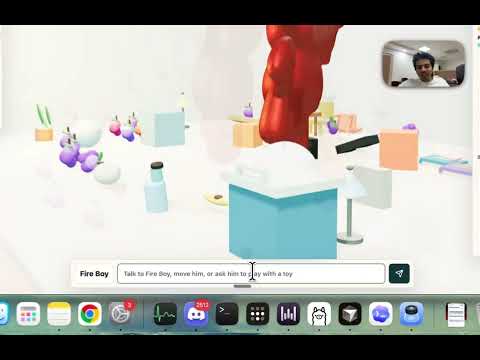
The visible steps are what make this demo worth watching. Instead of showing only the resulting character behavior, the interface lets viewers follow the sequence behind it. The bounded action choices also keep the interaction tied to a defined set of things the character can do.
This is the only MiniCPM-V 4.6 example in the group and the only one centered on a virtual pet. It is a strong starting point for anyone more interested in model-directed character behavior than in driving, steering, or constructing a browser world.
Which AI Game Demo Should You Watch First?
Begin with the yacht game if you want several controls to try within one simulation. Its camera angles, sea level selector, lighting choices, and horn give you multiple parts of the experience to examine. The lawn-mowing simulator is the better next stop for multiplayer movement and a first-person task.
Open the Minecraft demo for a browser-based building world. Watch the MiniCPM-V toy room when you want to see a model choose actions for a character while the interface reveals the steps.
Together, these demos cover four different ideas: controlling a vehicle on water, completing a familiar task around other players, presenting a block-building world in a browser, and directing a virtual pet through bounded actions. Each offers a concrete way to see what people are making with Claude Opus 5.5 or MiniCPM-V 4.6.